PMR livery template: with the 3D editor you don't need one
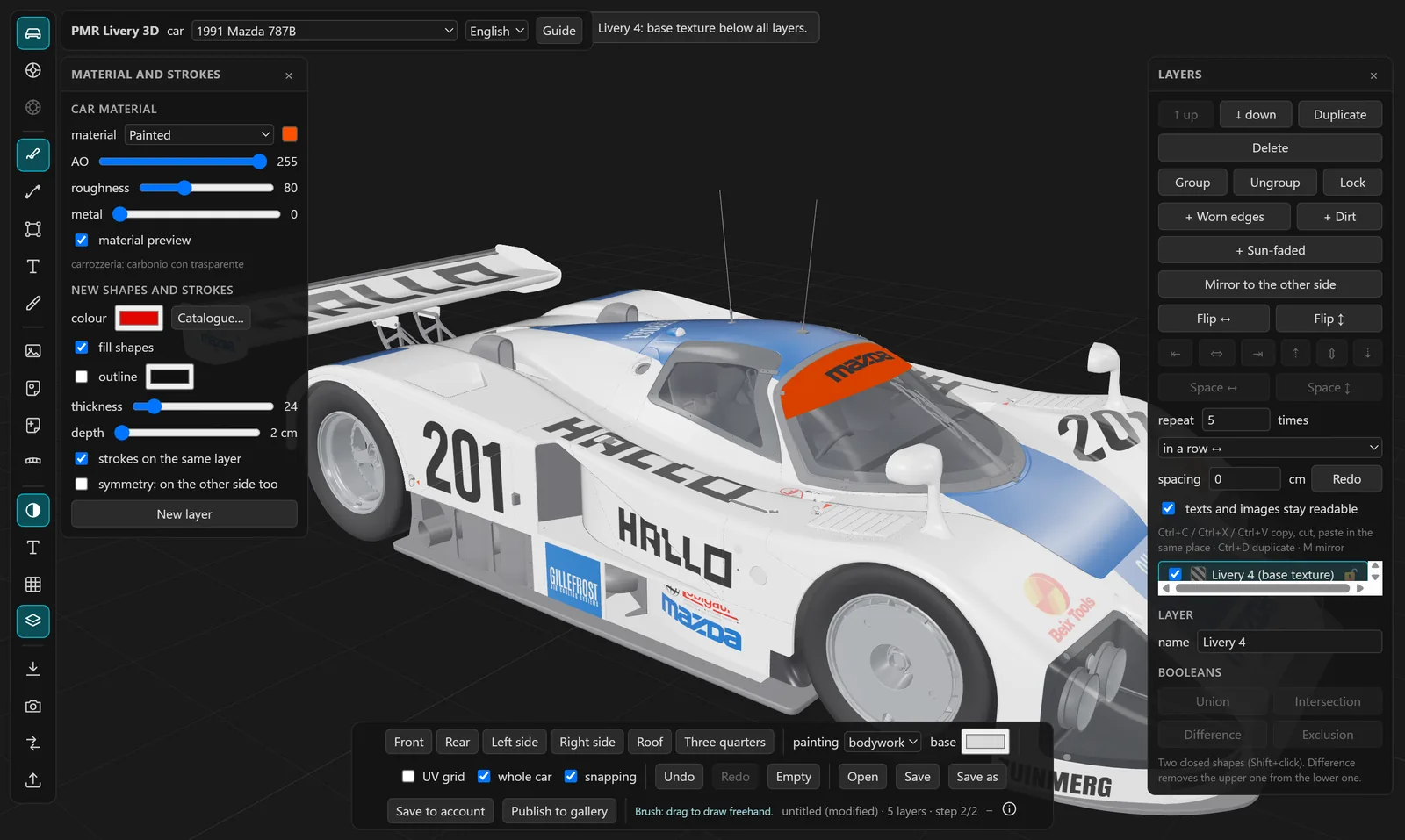
A livery usually starts from the template: the flat drawing of the bodywork, painted in a graphics program and then converted. With PMR Livery Hub that step is gone: you paint on the car in 3D and the editor writes the texture in the right place. No template to download, no conversions, no mod to assemble by hand.
- No template to download
- No conversions
- No mod to assemble by hand
What a livery template is
Every car in the game has a texture: an image where the bodywork is laid out flat, in pieces, like an unfolded paper model. The template is that map with the panel lines on it.
Working on it means guessing where every piece ends: a word can run across a seam, a logo can come out crooked or upside down, and often you only find out when you try the livery in the game.
What the 3D editor does for you
It already has the car
The 3D model and its map are already inside, for more than 100 cars of the game, DLC included.
It shows you where everything lands
Place stickers, text and numbers while looking at the car: you see right away if a logo runs over a door or a seam, and you move it before exporting.
It mirrors to the other side
An element placed on one side is copied to the other with one key, without working it out on the map.
It writes the texture and the mod
On export the editor saves the DDS textures in the game's format and builds the zip with thumbnail, icon and photos.
Prefer working flat? You can
The editor's Template panel
The grid button opens the car texture laid flat, with the parts grid in light blue. Draw on it and what you draw shows up on the car right away. Handy for sharp edges, straight lines and fills right up to the edge.
The site's 2D Studio
On the site, menu + Create → Livery on the template: a car template on a full page, with shapes, text, gradients and your stickers. From the editor you get there with the Open in 2D Studio button of the Template panel, and Open on the car takes you back to 3D.
A template you already painted
If you already painted a car template in your own program, open it in the editor with Starting livery → Start from a finished texture (PNG, JPEG, WebP or DDS): it lands in its place on the car by itself. Then add numbers, sponsors and text and export the mod.
From template to game: what you no longer have to do
| Usually | With PMR Livery Hub |
|---|---|
| Look for and download the car template | The car is already in the editor, with its 3D model |
| Paint flat and guess the panels | Paint on the car and see the result right away |
| Convert the image to DDS | The export saves the textures in the game's format |
| Prepare icon, photos and mod files by hand | The zip comes out complete, ready for the mods folder or ModHub |
Frequently asked questions
Where do I download the PMR livery template?
With the PMR Livery Hub editor you don't need it: pick the car and paint on the 3D model, the editor takes care of the texture map.
Can I still work on the flat template?
Yes, in two ways: the Template panel inside the editor, where what you draw shows up on the car right away, and the site's 2D Studio (menu + Create → Livery on the template).
I already painted a template in another program: can I use it?
Yes. In the editor choose Starting livery → Start from a finished texture: if it is the template of that car it lands in its place by itself. PNG, JPEG, WebP and DDS all work.
Do I have to convert the livery to DDS?
No. On export the editor saves the textures as DDS in the format the game asks for and builds the mod zip.
How do I avoid crooked logos between panels?
Place them while looking at the car in 3D: you see right away where each logo lands, seams included, and you move or resize it before exporting.
In the 2D Studio, does the template have the texture proportions?
Your choice: square like the game texture, or 2:3 like the original template, with the true proportions of the bodywork.
Does it work with every car?
Yes, with the 100+ cars of the game available in the editor, DLC included.
Try it without a template
Open the editor, pick the car and paint right on the bodywork.